Comments in Groovy

Comments are used to document your code. Comments in Groovy can be single line or multiline.

//

Single line comments are identified by using the // at any position in the line. An example is shown below −

class Example {
   static void main(String[] args) {
      // Using a simple println statement to print output to the console
      println('Hello World');
   }
}

/* */

Multiline comments are identified with /* in the beginning and */ to identify the end of the multiline comment.

class Example {
   static void main(String[] args) {
      /* This program is the first program
      This program shows how to display hello world */
      println('Hello World');
   }
}

Semicolons in groovy

Unlike in the Java programming language, it is not mandatory to have semicolons after the end of every statement, It is optional.

class Example {
   static void main(String[] args) {
      def x = 5
      println('Hello World');  
   }
}

If you execute the above program, both statements in the main method don’t generate any error.

Identifiers in Groovy

Identifiers are used to define variables, functions or other user-defined variables. Identifiers start with a letter, a dollar or an underscore. They cannot start with a number. Here are some examples of valid identifiers −

def employeename 
def student1 
def student_name

where def is a keyword used in Groovy to define an identifier.

Here is a code example of how an identifier can be used in our Hello World program.

class Example {
   static void main(String[] args) {
      // One can see the use of a semi-colon after each statement
      def x = 5;
      println('Hello World'); 
   }
}

In the above example, the variable x is used as an identifier.

Keywords Groovy

Keywords, as the name suggests are special words that are reserved in the Groovy Programming language. The following table lists the keywords which are defined in Groovy.

asassertbreakcase
catchclassconstcontinue
defdefaultdoelse
enumextendsfalseFinally
forgotoifimplements
importininstanceofinterface
newpullpackagereturn
superswitchthisthrow
throwstraittruetry
while

pwd Command in Linux

pwd stands for Print Working Directory. It prints the path of the working directory, starting from the root.
pwd is shell built-in command(pwd) or an actual binary(/bin/pwd).
$PWD is an environment variable which stores the path of the current directory.
This command has two flags.

pwd -L: Prints the symbolic path.
pwd -P: Prints the actual path.

https://www.youtube.com/watch?v=22jyErFb4S0

Data Types in Postgres

Exploring the Multitude of Data Types in PostgreSQL

In the realm of relational databases, PostgreSQL stands tall as a versatile and feature-rich option. One of its defining strengths lies in its extensive array of data types, providing developers and data architects with a wide spectrum of options to accurately model and store their data. From basic numeric types to specialized ones for geometries and JSON, PostgreSQL’s diverse collection of data types caters to a myriad of use cases. Let’s embark on a journey to explore the multitude of data types that PostgreSQL offers.

1. Numeric Data Types

PostgreSQL provides various numeric data types to handle different kinds of numerical values with precision:

  • Integer (INT): A standard whole number without a decimal point.
  • Decimal or Numeric (NUMERIC): Ideal for numbers requiring decimal points with precise storage for financial and scientific data.
  • Floating-Point (FLOAT and REAL): Approximate numeric values with a floating decimal point, with FLOAT providing more precision than REAL.

2. Character Data Types

For handling character and text data, PostgreSQL offers:

  • Character Varying (VARCHAR): Variable-length character strings.
  • Character (CHAR): Fixed-length character strings.
  • Text (TEXT): Non-specific character type for storing long strings of text.

3. Temporal Data Types

To deal with date and time values, PostgreSQL provides:

  • Date (DATE): Stores date values without time.
  • Time (TIME): Stores time values without a date.
  • Timestamp (TIMESTAMP): Stores both date and time.
  • Interval (INTERVAL): Represents a time interval.

4. Boolean Data Type

The BOOL type represents true or false values for logical operations.

5. Binary Data Types

For handling binary data, PostgreSQL offers:

  • Binary (BYTEA): Stores binary large objects (BLOBs) directly in the database.
  • UUID (UUID): Universally Unique Identifiers for generating unique identifiers.

6. Geometric Data Types

PostgreSQL includes specialized types for geometric shapes:

  • Point (POINT): Represents a point in a 2D plane.
  • Line (LINE) and Line Segment (LSEG): For lines and line segments.
  • Polygon (POLYGON): Represents a closed shape defined by points.

7. Array Data Types

The ARRAY type allows storing multiple values of the same data type in a single column.

8. JSON and JSONB Data Types

For handling JSON data, PostgreSQL offers:

  • JSON (JSON): Stores JSON data in its original form.
  • JSONB (JSONB): Binary representation of JSON data for faster indexing and querying.

9. Range Types

PostgreSQL also supports range types for representing a range of values of a particular data type, such as dates or integers.

10. Network Address Types

There are specialized data types for handling network addresses:

  • IP Address (INET): Stores IPv4 and IPv6 addresses.
  • MAC Address (MACADDR): Stores MAC addresses.

11. Enumerated Types

Developers can define their own enumerated types using the CREATE TYPE command, allowing for a finite set of values.

12. Composite Types

PostgreSQL supports composite types that allow grouping multiple fields together into a single type.

13. Custom Types

Users can create custom data types tailored to their specific needs, providing flexibility in data modeling.

Why Data Types Matter

Choosing the right data type is crucial for efficient storage, retrieval, and query performance:

  • Data Integrity: Ensures that the data stored matches the intended type, preventing errors.
  • Storage Efficiency: Proper data types help optimize storage space, particularly important for large datasets.
  • Query Optimization: Certain data types are better suited for specific types of queries, improving overall database performance.

List of all the data types available in the postgres

1. Numeric Types

1.1. Integer Types

1.2. Arbitrary Precision Numbers

1.3. Floating-Point Types

1.4. Serial Types

2. Monetary Types

3. Character Types

4. Binary Data Types

4.1. bytea Hex Format

4.2. bytea Escape Format

5. Date/Time Types

5.1. Date/Time Input

5.2. Date/Time Output

5.3. Time Zones

5.4. Interval Input

5.5. Interval Output

6. Boolean Type

7. Enumerated Types

7.1. Declaration of Enumerated Types

7.2. Ordering

7.3. Type Safety

7.4. Implementation Details

 Geometric Types

1. Points

2. Lines

3. Line Segments

4. Boxes

5. Paths

6. Polygons

7. Circles

9. Network Address Types

9.1. inet

9.2. cidr

9.3. inet vs. cidr

9.4. macaddr

10. Bit String Types

11. Text Search Types

11.1. tsvector

11.2. tsquery

12. UUID Type

13. XML Type

13.1. Creating XML Values

13.2. Encoding Handling

13.3. Accessing XML Values

14. JSON Types

14.1. JSON Input and Output Syntax

14.2. Designing JSON documents effectively

14.3. jsonb Containment and Existence

14.4. jsonb Indexing

15. Arrays

15.1. Declaration of Array Types

15.2. Array Value Input

15.3. Accessing Arrays

15.4. Modifying Arrays

15.5. Searching in Arrays

15.6. Array Input and Output Syntax

16. Composite Types

16.1. Declaration of Composite Types

16.2. Constructing Composite Values

16.3. Accessing Composite Types

16.4. Modifying Composite Types

16.5. Using Composite Types in Queries

16.6. Composite Type Input and Output Syntax

17. Range Types

17.1. Built-in Range Types

17.2. Examples

17.3. Inclusive and Exclusive Bounds

17.4. Infinite (Unbounded) Ranges

17.5. Range Input/Output

17.6. Constructing Ranges

17.7. Discrete Range Types

17. Defining New Range Types

17.9. Indexing

17.10. Constraints on Ranges

18 Object Identifier Types

19. pg_lsn Type

20. Pseudo-Types

Conclusion

PostgreSQL’s rich assortment of data types empowers users to design robust and efficient databases tailored to their application’s needs. Whether handling numeric values, textual data, dates, geometries, or JSON documents, PostgreSQL offers a comprehensive toolkit.

By understanding the nuances of these data types and choosing wisely, developers can craft databases that not only store data accurately but also perform optimally. So, the next time you’re architecting a PostgreSQL database, remember the wealth of data types at your disposal, each designed to bring precision and efficiency to your data management endeavors.

Regular Expression In Python

The module defines several functions, constants, and an exception. Some of the functions are simplified versions of the full-featured methods for compiled regular expressions. Most non-trivial applications always use the compiled form.

re.compile(patternflags=0)

Compile a regular expression pattern into a regular expression object, which can be used for matching using its match() and search() methods, described below.

The expression’s behavior can be modified by specifying a flags value. Values can be any of the following variables, combined using bitwise OR (the | operator).

The sequence

prog = re.compile(pattern)
result = prog.match(string)

is equivalent to

result = re.match(pattern, string)

but using re.compile() and saving the resulting regular expression object for reuse is more efficient when the expression will be used several times in a single program.

Note

The compiled versions of the most recent patterns passed to re.match()re.search() or re.compile() are cached, so programs that use only a few regular expressions at a time needn’t worry about compiling regular expressions.re.DEBUG

Display debug information about compiled expression.re.Ire.IGNORECASE

Perform case-insensitive matching; expressions like [A-Z] will match lowercase letters, too. This is not affected by the current locale. To get this effect on non-ASCII Unicode characters such as ü and Ü, add the UNICODE flag.re.Lre.LOCALE

Make \w\W\b\B\s and \S dependent on the current locale.re.Mre.MULTILINE

When specified, the pattern character '^' matches at the beginning of the string and at the beginning of each line (immediately following each newline); and the pattern character '$' matches at the end of the string and at the end of each line (immediately preceding each newline). By default, '^' matches only at the beginning of the string, and '$' only at the end of the string and immediately before the newline (if any) at the end of the string.re.Sre.DOTALL

Make the '.' special character match any character at all, including a newline; without this flag, '.' will match anything except a newline.re.Ure.UNICODE

Make the \w\W\b\B\d\D\s and \S sequences dependent on the Unicode character properties database. Also enables non-ASCII matching for IGNORECASE.

New in version 2.0.re.Xre.VERBOSE

This flag allows you to write regular expressions that look nicer and are more readable by allowing you to visually separate logical sections of the pattern and add comments. Whitespace within the pattern is ignored, except when in a character class, or when preceded by an unescaped backslash, or within tokens like *?(?: or (?P<...>. When a line contains a # that is not in a character class and is not preceded by an unescaped backslash, all characters from the leftmost such # through the end of the line are ignored.

This means that the two following regular expression objects that match a decimal number are functionally equal:

a = re.compile(r"""\d +  # the integral part
                   \.    # the decimal point
                   \d *  # some fractional digits""", re.X)
b = re.compile(r"\d+\.\d*")

re.search(patternstringflags=0)

Scan through string looking for the first location where the regular expression pattern produces a match, and return a corresponding MatchObject instance. Return None if no position in the string matches the pattern; note that this is different from finding a zero-length match at some point in the string.

re.match(patternstringflags=0)

If zero or more characters at the beginning of string match the regular expression pattern, return a corresponding MatchObject instance. Return None if the string does not match the pattern; note that this is different from a zero-length match.

Note that even in MULTILINE mode, re.match() will only match at the beginning of the string and not at the beginning of each line.

If you want to locate a match anywhere in string, use search() instead (see also search() vs. match()).

re.split(patternstringmaxsplit=0flags=0)

Split string by the occurrences of pattern. If capturing parentheses are used in pattern, then the text of all groups in the pattern are also returned as part of the resulting list. If maxsplit is nonzero, at most maxsplit splits occur, and the remainder of the string is returned as the final element of the list. (Incompatibility note: in the original Python 1.5 release, maxsplit was ignored. This has been fixed in later releases.)

>>> re.split('\W+', 'Words, words, words.')
['Words', 'words', 'words', '']
>>> re.split('(\W+)', 'Words, words, words.')
['Words', ', ', 'words', ', ', 'words', '.', '']
>>> re.split('\W+', 'Words, words, words.', 1)
['Words', 'words, words.']
>>> re.split('[a-f]+', '0a3B9', flags=re.IGNORECASE)
['0', '3', '9']

If there are capturing groups in the separator and it matches at the start of the string, the result will start with an empty string. The same holds for the end of the string:

>>> re.split('(\W+)', '...words, words...')
['', '...', 'words', ', ', 'words', '...', '']

That way, separator components are always found at the same relative indices within the result list (e.g., if there’s one capturing group in the separator, the 0th, the 2nd and so forth).

Note that split will never split a string on an empty pattern match. For example:

>>> re.split('x*', 'foo')
['foo']
>>> re.split("(?m)^$", "foo\n\nbar\n")
['foo\n\nbar\n']

Changed in version 2.7: Added the optional flags argument.

re.findall(patternstringflags=0)

Return all non-overlapping matches of pattern in string, as a list of strings. The string is scanned left-to-right, and matches are returned in the order found. If one or more groups are present in the pattern, return a list of groups; this will be a list of tuples if the pattern has more than one group. Empty matches are included in the result.

Note

Due to the limitation of the current implementation the character following an empty match is not included in a next match, so findall(r'^|\w+', 'two words') returns ['', 'wo', 'words'] (note missed “t”). This is changed in Python 3.7.

New in version 1.5.2.

Changed in version 2.4: Added the optional flags argument.

re.finditer(patternstringflags=0)

Return an iterator yielding MatchObject instances over all non-overlapping matches for the RE pattern in string. The string is scanned left-to-right, and matches are returned in the order found. Empty matches are included in the result. See also the note about findall().

New in version 2.2.

Changed in version 2.4: Added the optional flags argument.re.sub(patternreplstringcount=0flags=0)

Return the string obtained by replacing the leftmost non-overlapping occurrences of pattern in string by the replacement repl. If the pattern isn’t found, string is returned unchanged. repl can be a string or a function; if it is a string, any backslash escapes in it are processed. That is, \n is converted to a single newline character, \r is converted to a carriage return, and so forth. Unknown escapes such as \j are left alone. Backreferences, such as \6, are replaced with the substring matched by group 6 in the pattern. For example:

>>> re.sub(r'def\s+([a-zA-Z_][a-zA-Z_0-9]*)\s*\(\s*\):',
...        r'static PyObject*\npy_\1(void)\n{',
...        'def myfunc():')
'static PyObject*\npy_myfunc(void)\n{'

If repl is a function, it is called for every non-overlapping occurrence of pattern. The function takes a single match object argument, and returns the replacement string. For example:

>>> def dashrepl(matchobj):
...     if matchobj.group(0) == '-': return ' '
...     else: return '-'
>>> re.sub('-{1,2}', dashrepl, 'pro----gram-files')
'pro--gram files'
>>> re.sub(r'\sAND\s', ' & ', 'Baked Beans And Spam', flags=re.IGNORECASE)
'Baked Beans & Spam'

The pattern may be a string or an RE object.

The optional argument count is the maximum number of pattern occurrences to be replaced; count must be a non-negative integer. If omitted or zero, all occurrences will be replaced. Empty matches for the pattern are replaced only when not adjacent to a previous match, so sub('x*', '-', 'abc') returns '-a-b-c-'.

In string-type repl arguments, in addition to the character escapes and backreferences described above, \g<name> will use the substring matched by the group named name, as defined by the (?P<name>...) syntax. \g<number> uses the corresponding group number; \g<2> is therefore equivalent to \2, but isn’t ambiguous in a replacement such as \g<2>0\20 would be interpreted as a reference to group 20, not a reference to group 2 followed by the literal character '0'. The backreference \g<0> substitutes in the entire substring matched by the RE.

Changed in version 2.7: Added the optional flags argument.re.subn(patternreplstringcount=0flags=0)

Perform the same operation as sub(), but return a tuple (new_string, number_of_subs_made).

Changed in version 2.7: Added the optional flags argument.re.escape(pattern)

Escape all the characters in pattern except ASCII letters and numbers. This is useful if you want to match an arbitrary literal string that may have regular expression metacharacters in it. For example:

>>> print re.escape('python.exe')
python\.exe

>>> legal_chars = string.ascii_lowercase + string.digits + "!#$%&'*+-.^_`|~:"
>>> print '[%s]+' % re.escape(legal_chars)
[abcdefghijklmnopqrstuvwxyz0123456789\!\#\$\%\&\'\*\+\-\.\^\_\`\|\~\:]+

>>> operators = ['+', '-', '*', '/', '**']
>>> print '|'.join(map(re.escape, sorted(operators, reverse=True)))
\/|\-|\+|\*\*|\*

re.purge()

Clear the regular expression cache.exception re.error

Exception raised when a string passed to one of the functions here is not a valid regular expression (for example, it might contain unmatched parentheses) or when some other error occurs during compilation or matching. It is never an error if a string contains no match for a pattern.

\number

Matches the contents of the group of the same number. Groups are numbered starting from 1. For example, (.+) \1 matches 'the the' or '55 55', but not 'thethe' (note the space after the group). This special sequence can only be used to match one of the first 99 groups. If the first digit of number is 0, or number is 3 octal digits long, it will not be interpreted as a group match, but as the character with octal value number. Inside the '[' and ']' of a character class, all numeric escapes are treated as characters.

\A

Matches only at the start of the string.

\b

Matches the empty string, but only at the beginning or end of a word. A word is defined as a sequence of alphanumeric or underscore characters, so the end of a word is indicated by whitespace or a non-alphanumeric, non-underscore character. Note that formally, \b is defined as the boundary between a \w and a \W character (or vice versa), or between \w and the beginning/end of the string, so the precise set of characters deemed to be alphanumeric depends on the values of the UNICODE and LOCALE flags. For example, r'\bfoo\b' matches 'foo''foo.''(foo)''bar foo baz' but not 'foobar' or 'foo3'. Inside a character range, \b represents the backspace character, for compatibility with Python’s string literals.

\B

Matches the empty string, but only when it is not at the beginning or end of a word. This means that r'py\B' matches 'python''py3''py2', but not 'py''py.', or 'py!'\B is just the opposite of \b, so is also subject to the settings of LOCALE and UNICODE.

\d

When the UNICODE flag is not specified, matches any decimal digit; this is equivalent to the set [0-9]. With UNICODE, it will match whatever is classified as a decimal digit in the Unicode character properties database.

\D

When the UNICODE flag is not specified, matches any non-digit character; this is equivalent to the set [^0-9]. With UNICODE, it will match anything other than character marked as digits in the Unicode character properties database.

\s

When the UNICODE flag is not specified, it matches any whitespace character, this is equivalent to the set [ \t\n\r\f\v]. The LOCALE flag has no extra effect on matching of the space. If UNICODE is set, this will match the characters [ \t\n\r\f\v] plus whatever is classified as space in the Unicode character properties database.

\S

When the UNICODE flag is not specified, matches any non-whitespace character; this is equivalent to the set [^ \t\n\r\f\v] The LOCALE flag has no extra effect on non-whitespace match. If UNICODE is set, then any character not marked as space in the Unicode character properties database is matched.

\w

When the LOCALE and UNICODE flags are not specified, matches any alphanumeric character and the underscore; this is equivalent to the set [a-zA-Z0-9_]. With LOCALE, it will match the set [0-9_] plus whatever characters are defined as alphanumeric for the current locale. If UNICODE is set, this will match the characters [0-9_] plus whatever is classified as alphanumeric in the Unicode character properties database.

\W

When the LOCALE and UNICODE flags are not specified, matches any non-alphanumeric character; this is equivalent to the set [^a-zA-Z0-9_]. With LOCALE, it will match any character not in the set [0-9_], and not defined as alphanumeric for the current locale. If UNICODE is set, this will match anything other than [0-9_] plus characters classified as not alphanumeric in the Unicode character properties database.

\Z

Matches only at the end of the string.

'.'

(Dot.) In the default mode, this matches any character except a newline. If the DOTALL flag has been specified, this matches any character including a newline.

'^'

(Caret.) Matches the start of the string, and in MULTILINE mode also matches immediately after each newline.

'$'

Matches the end of the string or just before the newline at the end of the string, and in MULTILINE mode also matches before a newline. foo matches both ‘foo’ and ‘foobar’, while the regular expression foo$ matches only ‘foo’. More interestingly, searching for foo.$ in 'foo1\nfoo2\n' matches ‘foo2’ normally, but ‘foo1’ in MULTILINE mode; searching for a single $ in 'foo\n' will find two (empty) matches: one just before the newline, and one at the end of the string.

'*'

It causes the resulting RE to match 0 or more repetitions of the preceding RE, as many repetitions as are possible. ab* will match ‘a’, ‘ab’, or ‘a’ followed by any number of ‘b’s.

'+'

Causes the resulting RE to match 1 or more repetitions of the preceding RE. ab+ will match ‘a’ followed by any non-zero number of ‘b’s; it will not match just ‘a’.

'?'

Causes the resulting RE to match 0 or 1 repetitions of the preceding RE. ab? will match either ‘a’ or ‘ab’.

*?+???

The '*''+', and '?' qualifiers are all greedy; they match as much text as possible. Sometimes this behaviour isn’t desired; if the RE <.*> is matched against <a> b <c>, it will match the entire string, and not just <a>. Adding ? after the qualifier makes it perform the match in non-greedy or minimal fashion; as few characters as possible will be matched. Using the RE <.*?> will match only <a>.

{m}

Specifies that exactly m copies of the previous RE should be matched; fewer matches cause the entire RE not to match. For example, a{6} will match exactly six 'a' characters, but not five.

{m,n}

Causes the resulting RE to match from m to n repetitions of the preceding RE, attempting to match as many repetitions as possible. For example, a{3,5} will match from 3 to 5 'a' characters. Omitting m specifies a lower bound of zero, and omitting n specifies an infinite upper bound. As an example, a{4,}b will match aaaab or a thousand 'a' characters followed by a b, but not aaab. The comma may not be omitted or the modifier would be confused with the previously described form.

{m,n}?

Causes the resulting RE to match from m to n repetitions of the preceding RE, attempting to match as few repetitions as possible. This is the non-greedy version of the previous qualifier. For example, on the 6-character string 'aaaaaa'a{3,5} will match 5 'a' characters, while a{3,5}? will only match 3 characters.

'\'

Either escapes special characters (permitting you to match characters like '*''?', and so forth), or signals a special sequence; special sequences are discussed below.

If you’re not using a raw string to express the pattern, remember that Python also uses the backslash as an escape sequence in string literals; if the escape sequence isn’t recognized by Python’s parser, the backslash and subsequent character are included in the resulting string. However, if Python would recognize the resulting sequence, the backslash should be repeated twice. This is complicated and hard to understand, so it’s highly recommended that you use raw strings for all but the simplest expressions.

[]

Used to indicate a set of characters. In a set:

  • Characters can be listed individually, e.g. [amk] will match 'a''m', or 'k'.
  • Ranges of characters can be indicated by giving two characters and separating them by a '-', for example [a-z] will match any lowercase ASCII letter, [0-5][0-9] will match all the two-digits numbers from 00 to 59, and [0-9A-Fa-f] will match any hexadecimal digit. If - is escaped (e.g. [a\-z]) or if it’s placed as the first or last character (e.g. [a-]), it will match a literal '-'.
  • Special characters lose their special meaning inside sets. For example, [(+*)] will match any of the literal characters '(''+''*', or ')'.
  • Character classes such as \w or \S (defined below) are also accepted inside a set, although the characters they match depends on whether LOCALE or UNICODE mode is in force.
  • Characters that are not within a range can be matched by complementing the set. If the first character of the set is '^', all the characters that are not in the set will be matched. For example, [^5] will match any character except '5', and [^^] will match any character except '^'^ has no special meaning if it’s not the first character in the set.
  • To match a literal ']' inside a set, precede it with a backslash, or place it at the beginning of the set. For example, both [()[\]{}] and []()[{}] will both match a parenthesis.

'|'

A|B, where A and B can be arbitrary REs, creates a regular expression that will match either A or B. An arbitrary number of REs can be separated by the '|' in this way. This can be used inside groups (see below) as well. As the target string is scanned, REs separated by '|' are tried from left to right. When one pattern completely matches, that branch is accepted. This means that once A matches, B will not be tested further, even if it would produce a longer overall match. In other words, the '|' operator is never greedy. To match a literal '|', use \|, or enclose it inside a character class, as in [|].

(...)

Matches whatever regular expression is inside the parentheses, and indicates the start and end of a group; the contents of a group can be retrieved after a match has been performed, and can be matched later in the string with the \number special sequence, described below. To match the literals '(' or ')', use \( or \), or enclose them inside a character class: [(] [)].

(?...)

This is an extension notation (a '?' following a '(' is not meaningful otherwise). The first character after the '?' determines what the meaning and further syntax of the construct is. Extensions usually do not create a new group; (?P<name>...) is the only exception to this rule. Following are the currently supported extensions.

(?iLmsux)

(One or more letters from the set 'i''L''m''s''u''x'.) The group matches the empty string; the letters set the corresponding flags: re.I (ignore case), re.L (locale dependent), re.M (multi-line), re.S (dot matches all), re.U (Unicode dependent), and re.X (verbose), for the entire regular expression. (The flags are described in Module Contents.) This is useful if you wish to include the flags as part of the regular expression, instead of passing a flag argument to the re.compile() function.

Note that the (?x) flag changes how the expression is parsed. It should be used first in the expression string, or after one or more whitespace characters. If there are non-whitespace characters before the flag, the results are undefined.

(?:...)

A non-capturing version of regular parentheses. Matches whatever regular expression is inside the parentheses, but the substring matched by the group cannot be retrieved after performing a match or referenced later in the pattern.

(?P<name>...)

Similar to regular parentheses, but the substring matched by the group is accessible via the symbolic group name name. Group names must be valid Python identifiers, and each group name must be defined only once within a regular expression. A symbolic group is also a numbered group, just as if the group were not named.

Named groups can be referenced in three contexts. If the pattern is (?P<quote>['"]).*?(?P=quote) (i.e. matching a string quoted with either single or double quotes):

Context of reference to group “quote”Ways to reference it
in the same pattern itself(?P=quote) (as shown)\1
when processing match object mm.group('quote')m.end('quote') (etc.)
in a string passed to the repl argument of re.sub()\g<quote>\g<1>\1

(?P=name)

A backreference to a named group; it matches whatever text was matched by the earlier group named name.(?#...)

A comment; the contents of the parentheses are simply ignored.(?=...)

Matches if ... matches next, but doesn’t consume any of the string. This is called a lookahead assertion. For example, Isaac (?=Asimov) will match 'Isaac ' only if it’s followed by 'Asimov'.(?!...)

Matches if ... doesn’t match next. This is a negative lookahead assertion. For example, Isaac (?!Asimov) will match 'Isaac ' only if it’s not followed by 'Asimov'.(?<=...)

Matches if the current position in the string is preceded by a match for ... that ends at the current position. This is called a positive lookbehind assertion(?<=abc)def will find a match in abcdef, since the lookbehind will back up 3 characters and check if the contained pattern matches. The contained pattern must only match strings of some fixed length, meaning that abc or a|b are allowed, but a* and a{3,4} are not. Group references are not supported even if they match strings of some fixed length. Note that patterns which start with positive lookbehind assertions will not match at the beginning of the string being searched; you will most likely want to use the search() function rather than the match() function:

>>> import re
>>> m = re.search('(?<=abc)def', 'abcdef')
>>> m.group(0)
'def'

This example looks for a word following a hyphen:

>>> m = re.search('(?<=-)\w+', 'spam-egg')
>>> m.group(0)
'egg'

(?<!...)

Matches if the current position in the string is not preceded by a match for .... This is called a negative lookbehind assertion. Similar to positive lookbehind assertions, the contained pattern must only match strings of some fixed length and shouldn’t contain group references. Patterns which start with negative lookbehind assertions may match at the beginning of the string being searched.(?(id/name)yes-pattern|no-pattern)

Will try to match with yes-pattern if the group with given id or name exists, and with no-pattern if it doesn’t. no-pattern is optional and can be omitted. For example, (<)?(\w+@\w+(?:\.\w+)+)(?(1)>) is a poor email matching pattern, which will match with '<[email protected]>' as well as '[email protected]', but not with '<[email protected]'.
Python Exception Handling

Until now error messages haven’t been more than mentioned, but if you have tried out the examples you have probably seen some. There are (at least) two distinguishable kinds of errors: syntax errors and exceptions.

1. Syntax Errors

Syntax errors, also known as parsing errors, are perhaps the most common kind of complaint you get while you are still learning Python:>>>

>>> while True print('Hello world')
  File "<stdin>", line 1
    while True print('Hello world')
                   ^
SyntaxError: invalid syntax

The parser repeats the offending line and displays a little ‘arrow’ pointing at the earliest point in the line where the error was detected. The error is caused by (or at least detected at) the token preceding the arrow: in the example, the error is detected at the function print(), since a colon (':') is missing before it. File name and line number are printed so you know where to look in case the input came from a script.

2. Exceptions

Even if a statement or expression is syntactically correct, it may cause an error when an attempt is made to execute it. Errors detected during execution are called exceptions and are not unconditionally fatal: you will soon learn how to handle them in Python programs. Most exceptions are not handled by programs, however, and result in error messages as shown here:>>>

>>> 10 * (1/0)
Traceback (most recent call last):
  File "<stdin>", line 1, in <module>
ZeroDivisionError: division by zero
>>> 4 + spam*3
Traceback (most recent call last):
  File "<stdin>", line 1, in <module>
NameError: name 'spam' is not defined
>>> '2' + 2
Traceback (most recent call last):
  File "<stdin>", line 1, in <module>
TypeError: Can't convert 'int' object to str implicitly

The last line of the error message indicates what happened. Exceptions come in different types, and the type is printed as part of the message: the types in the example are ZeroDivisionErrorNameError and TypeError. The string printed as the exception type is the name of the built-in exception that occurred. This is true for all built-in exceptions, but need not be true for user-defined exceptions (although it is a useful convention). Standard exception names are built-in identifiers (not reserved keywords).

The rest of the line provides detail based on the type of exception and what caused it.

The preceding part of the error message shows the context where the exception happened, in the form of a stack traceback. In general it contains a stack traceback listing source lines; however, it will not display lines read from standard input.

Built-in Exceptions lists the built-in exceptions and their meanings.

3. Handling Exceptions

It is possible to write programs that handle selected exceptions. Look at the following example, which asks the user for input until a valid integer has been entered, but allows the user to interrupt the program (using Control-C or whatever the operating system supports); note that a user-generated interruption is signalled by raising the KeyboardInterrupt exception.>>>

>>> while True:
...     try:
...         x = int(input("Please enter a number: "))
...         break
...     except ValueError:
...         print("Oops!  That was no valid number.  Try again...")
...

The try statement works as follows.

  • First, the try clause (the statement(s) between the try and except keywords) is executed.
  • If no exception occurs, the except clause is skipped and execution of the try statement is finished.
  • If an exception occurs during execution of the try clause, the rest of the clause is skipped. Then if its type matches the exception named after the except keyword, the except clause is executed, and then execution continues after the try statement.
  • If an exception occurs which does not match the exception named in the except clause, it is passed on to outer try statements; if no handler is found, it is an unhandled exception and execution stops with a message as shown above.

try statement may have more than one except clause, to specify handlers for different exceptions. At most one handler will be executed. Handlers only handle exceptions that occur in the corresponding try clause, not in other handlers of the same try statement. An except clause may name multiple exceptions as a parenthesized tuple, for example:

... except (RuntimeError, TypeError, NameError):
...     pass

A class in an except clause is compatible with an exception if it is the same class or a base class thereof (but not the other way around — an except clause listing a derived class is not compatible with a base class). For example, the following code will print B, C, D in that order:

class B(Exception):
    pass

class C(B):
    pass

class D(C):
    pass

for cls in [B, C, D]:
    try:
        raise cls()
    except D:
        print("D")
    except C:
        print("C")
    except B:
        print("B")

Note that if the except clauses were reversed (with except B first), it would have printed B, B, B — the first matching except clause is triggered.

The last except clause may omit the exception name(s), to serve as a wildcard. Use this with extreme caution, since it is easy to mask a real programming error in this way! It can also be used to print an error message and then re-raise the exception (allowing a caller to handle the exception as well):

import sys

try:
    f = open('myfile.txt')
    s = f.readline()
    i = int(s.strip())
except OSError as err:
    print("OS error: {0}".format(err))
except ValueError:
    print("Could not convert data to an integer.")
except:
    print("Unexpected error:", sys.exc_info()[0])
    raise

The try … except statement has an optional else clause, which, when present, must follow all except clauses. It is useful for code that must be executed if the try clause does not raise an exception. For example:

for arg in sys.argv[1:]:
    try:
        f = open(arg, 'r')
    except OSError:
        print('cannot open', arg)
    else:
        print(arg, 'has', len(f.readlines()), 'lines')
        f.close()

The use of the else clause is better than adding additional code to the try clause because it avoids accidentally catching an exception that wasn’t raised by the code being protected by the try … except statement.

When an exception occurs, it may have an associated value, also known as the exception’s argument. The presence and type of the argument depend on the exception type.

The except clause may specify a variable after the exception name. The variable is bound to an exception instance with the arguments stored in instance.args. For convenience, the exception instance defines __str__() so the arguments can be printed directly without having to reference .args. One may also instantiate an exception first before raising it and add any attributes to it as desired.>>>

>>> try:
...     raise Exception('spam', 'eggs')
... except Exception as inst:
...     print(type(inst))    # the exception instance
...     print(inst.args)     # arguments stored in .args
...     print(inst)          # __str__ allows args to be printed directly,
...                          # but may be overridden in exception subclasses
...     x, y = inst.args     # unpack args
...     print('x =', x)
...     print('y =', y)
...
<class 'Exception'>
('spam', 'eggs')
('spam', 'eggs')
x = spam
y = eggs

If an exception has arguments, they are printed as the last part (‘detail’) of the message for unhandled exceptions.

Exception handlers don’t just handle exceptions if they occur immediately in the try clause, but also if they occur inside functions that are called (even indirectly) in the try clause. For example:>>>

>>> def this_fails():
...     x = 1/0
...
>>> try:
...     this_fails()
... except ZeroDivisionError as err:
...     print('Handling run-time error:', err)
...
Handling run-time error: division by zero

4. Raising Exceptions

The raise statement allows the programmer to force a specified exception to occur. For example:>>>

>>> raise NameError('HiThere')
Traceback (most recent call last):
  File "<stdin>", line 1, in <module>
NameError: HiThere

The sole argument to raise indicates the exception to be raised. This must be either an exception instance or an exception class (a class that derives from Exception). If an exception class is passed, it will be implicitly instantiated by calling its constructor with no arguments:

raise ValueError  # shorthand for 'raise ValueError()'

If you need to determine whether an exception was raised but don’t intend to handle it, a simpler form of the raise statement allows you to re-raise the exception:>>>

>>> try:
...     raise NameError('HiThere')
... except NameError:
...     print('An exception flew by!')
...     raise
...
An exception flew by!
Traceback (most recent call last):
  File "<stdin>", line 2, in <module>
NameError: HiThere

5. User-defined Exceptions

Programs may name their own exceptions by creating a new exception class (see Classes for more about Python classes). Exceptions should typically be derived from the Exception class, either directly or indirectly.

Exception classes can be defined which do anything any other class can do, but are usually kept simple, often only offering a number of attributes that allow information about the error to be extracted by handlers for the exception. When creating a module that can raise several distinct errors, a common practice is to create a base class for exceptions defined by that module, and subclass that to create specific exception classes for different error conditions:

class Error(Exception):
    """Base class for exceptions in this module."""
    pass

class InputError(Error):
    """Exception raised for errors in the input.

    Attributes:
        expression -- input expression in which the error occurred
        message -- explanation of the error
    """

    def __init__(self, expression, message):
        self.expression = expression
        self.message = message

class TransitionError(Error):
    """Raised when an operation attempts a state transition that's not
    allowed.

    Attributes:
        previous -- state at beginning of transition
        next -- attempted new state
        message -- explanation of why the specific transition is not allowed
    """

    def __init__(self, previous, next, message):
        self.previous = previous
        self.next = next
        self.message = message

Most exceptions are defined with names that end in “Error”, similar to the naming of the standard exceptions.

Many standard modules define their own exceptions to report errors that may occur in functions they define. More information on classes is presented in chapter Classes.

6. Defining Clean-up Actions

The try statement has another optional clause which is intended to define clean-up actions that must be executed under all circumstances. For example:>>>

>>> try:
...     raise KeyboardInterrupt
... finally:
...     print('Goodbye, world!')
...
Goodbye, world!
KeyboardInterrupt
Traceback (most recent call last):
  File "<stdin>", line 2, in <module>

If a finally clause is present, the finally clause will execute as the last task before the try statement completes. The finally clause runs whether or not the try statement produces an exception. The following points discuss more complex cases when an exception occurs:

  • If an exception occurs during execution of the try clause, the exception may be handled by an except clause. In all cases, the exception is re-raised after the finally clause has been executed.
  • An exception could occur during execution of an except or else clause. Again, the exception is re-raised after the finally clause has been executed.
  • If the try statement reaches a breakcontinue or return statement, the finally clause will execute just prior to the breakcontinue or return statement’s execution.
  • If a finally clause includes a return statement, the finally clause’s return statement will execute before, and instead of, the return statement in a try clause.

For example:>>>

>>> def bool_return():
...     try:
...         return True
...     finally:
...         return False
...
>>> bool_return()
False

A more complicated example:>>>

>>> def divide(x, y):
...     try:
...         result = x / y
...     except ZeroDivisionError:
...         print("division by zero!")
...     else:
...         print("result is", result)
...     finally:
...         print("executing finally clause")
...
>>> divide(2, 1)
result is 2.0
executing finally clause
>>> divide(2, 0)
division by zero!
executing finally clause
>>> divide("2", "1")
executing finally clause
Traceback (most recent call last):
  File "<stdin>", line 1, in <module>
  File "<stdin>", line 3, in divide
TypeError: unsupported operand type(s) for /: 'str' and 'str'

As you can see, the finally clause is executed in any event. The TypeError raised by dividing two strings is not handled by the except clause and therefore re-raised after the finally clause has been executed.

In real world applications, the finally clause is useful for releasing external resources (such as files or network connections), regardless of whether the use of the resource was successful.

7. Predefined Clean-up Actions

Some objects define standard clean-up actions to be undertaken when the object is no longer needed, regardless of whether or not the operation using the object succeeded or failed. Look at the following example, which tries to open a file and print its contents to the screen.

for line in open("myfile.txt"):
    print(line, end="")

The problem with this code is that it leaves the file open for an indeterminate amount of time after this part of the code has finished executing. This is not an issue in simple scripts, but can be a problem for larger applications. The with statement allows objects like files to be used in a way that ensures they are always cleaned up promptly and correctly.

with open("myfile.txt") as f:
    for line in f:
        print(line, end="")

After the statement is executed, the file f is always closed, even if a problem was encountered while processing the lines. Objects which, like files, provide predefined clean-up actions will indicate this in their documentation.

Python (interpreter) raises exceptions when it encounters errors. For example: divided by zero. In this article, you will learn about different exceptions that are built-in in Python.

When writing a program, we, more often than not, will encounter errors.

Error caused by not following the proper structure (syntax) of the language is called syntax error or parsing error.

>>> if a < 3  File "<interactive input>", line 1    if a < 3           ^SyntaxError: invalid syntax

We can notice here that a colon is missing in the if statement.

Errors can also occur at runtime and these are called exceptions. They occur, for example, when a file we try to open does not exist (FileNotFoundError), dividing a number by zero (ZeroDivisionError), module we try to import is not found (ImportError) etc.

Whenever these types of runtime errors occur, Python creates an exception object. If not handled properly, it prints a traceback to that error along with some details about why that error occurred.

>>> 1 / 0Traceback (most recent call last): File "<string>", line 301, in runcode File "<interactive input>", line 1, in <module>ZeroDivisionError: division by zero>>> open("imaginary.txt")Traceback (most recent call last): File "<string>", line 301, in runcode File "<interactive input>", line 1, in <module>FileNotFoundError: [Errno 2] No such file or directory: 'imaginary.txt'

Python Built-in Exceptions

Illegal operations can raise exceptions. There are plenty of built-in exceptions in Python that are raised when corresponding errors occur. We can view all the built-in exceptions using the local() built-in functions as follows.

>>> locals()['__builtins__']

This will return us a dictionary of built-in exceptions, functions and attributes.

Some of the common built-in exceptions in Python programming along with the error that cause then are tabulated below.

ExceptionCause of Error
AssertionErrorRaised when assert statement fails.
AttributeErrorRaised when attribute assignment or reference fails.
EOFErrorRaised when the input() functions hits end-of-file condition.
FloatingPointErrorRaised when a floating point operation fails.
GeneratorExitRaise when a generator’s close() method is called.
ImportErrorRaised when the imported module is not found.
IndexErrorRaised when index of a sequence is out of range.
KeyErrorRaised when a key is not found in a dictionary.
KeyboardInterruptRaised when the user hits interrupt key (Ctrl+c or delete).
MemoryErrorRaised when an operation runs out of memory.
NameErrorRaised when a variable is not found in local or global scope.
NotImplementedErrorRaised by abstract methods.
OSErrorRaised when system operation causes system related error.
OverflowErrorRaised when result of an arithmetic operation is too large to be represented.
ReferenceErrorRaised when a weak reference proxy is used to access a garbage collected referent.
RuntimeErrorRaised when an error does not fall under any other category.
StopIterationRaised by next() function to indicate that there is no further item to be returned by iterator.
SyntaxErrorRaised by parser when syntax error is encountered.
IndentationErrorRaised when there is incorrect indentation.
TabErrorRaised when indentation consists of inconsistent tabs and spaces.
SystemErrorRaised when interpreter detects internal error.
SystemExitRaised by sys.exit() function.
TypeErrorRaised when a function or operation is applied to an object of incorrect type.
UnboundLocalErrorRaised when a reference is made to a local variable in a function or method, but no value has been bound to that variable.
UnicodeErrorRaised when a Unicode-related encoding or decoding error occurs.
UnicodeEncodeErrorRaised when a Unicode-related error occurs during encoding.
UnicodeDecodeErrorRaised when a Unicode-related error occurs during decoding.
UnicodeTranslateErrorRaised when a Unicode-related error occurs during translating.
ValueErrorRaised when a function gets argument of correct type but improper value.
ZeroDivisionErrorRaised when second operand of division or modulo operation is zero.

We can also define our own exception in Python (if required). Visit this page to learn more about user-defined exceptions. 

We can handle these built-in and user-defined exceptions in Python using try, except and finally statements. 

File Handling In Python

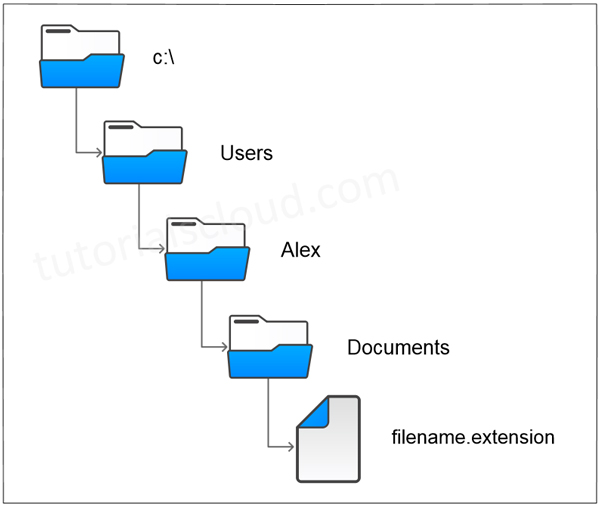
There are always two parts of a file in the computer system, the filename and its extension. Also, the files have two key properties – its name and the location or path, which specifies the location where the file exists. The filename has two parts, and they are separated by a dot (.) or period.

Figure – File and its path:

Directory Structure

A built-in open method is used to create a Python file-object, which provides a connection to the file that is residing on programmer’s machine. After calling the function open, programmers can transfer strings of data to and from the external file that is residing in the machine.

File Opening In Python

open() function is used to open a file in Python. It’s mainly required two arguments, first the file name and then file opening mode.Syntax:

file_object = open(filename [,mode] [,buffering])

In the above syntax the parameters used are:

  • filename: It is the name of the file.
  • mode: It tells the program in which mode the file has to be open.
  • buffering: Here, if the value is set to zero (0), no buffering will occur while accessing a file, if the value is set to top one (1), line buffering will be performed while accessing a file.

Modes Of Opening File In Python

The file can be opened in the following modes:

ModeDescription
rOpens a file for reading only. (It’s a default mode.)
wOpens a file for writing. (If a file doesn’t exist already, then it creates a new file. Otherwise, it’s truncate a file.)
xOpens a file for exclusive creation. (Operation fails if a file does not exist in the location.)
aOpens a file for appending at the end of the file without truncating it. (Creates a new file if it does not exist in the location.)
tOpens a file in text mode. (It’s a default mode.)
bOpens a file in binary mode.
+Opens a file for updating (reading and writing.)

File Object Attributes

If an attempt to open a file fails then open returns a false value, otherwise it returns a file object that provides various information related to that file.Example:

# file opening example in Python
fo = open("sample.txt", "wb")
    print ("File Name: ", fo.name)
    print ("Mode of Opening: ", fo.mode)
    print ("Is Closed: ", fo.closed)
    print ("Softspace flag : ", fo.softspace)

Output:

File Name: sample.txt
Mode of Opening: wb
Is Closed: False
Softspace flag: 0

File Reading In Python

For reading and writing text data different text-encoding schemes are used such as ASCII (American Standard Code for Information Interchange), UTF-8 (Unicode Transformation Format), UTF-16.

Once a file is opened using open() method then it can be read by a method called read().Example:

# read the entire file as one string
with open('filename.txt') as f:
data = f.read()

# Iterate over the lines of the File
with open('filename.txt') as f:
for line in f :
   print(line, end=' ')
# process the lines

File Writing In Python

Similarly, for writing data to files, we have to use open() with ‘wt‘ mode, clearing and overwriting the previous content. Also, we have to use write() function to write into a file.Example:

# Write text data to a file
with open('filename.txt' , 'wt') as f:
    f.write ('hi there, this is a first line of file.\n')
    f.write ('and another line.\n')

Output:

hi there, this is a first line of file.
and another line.

By default, in Python – using the system default text encoding files are read/written. Though Python can understand several hundred text-encodings but the most common encoding techniques used are ASCII, Latin-1, UTF-8, UTF-16, etc. The use of ‘with’ statement in the example establishes a context in which the file will be used. As the control leaves the ‘with’ block, the file gets closed automatically.

Writing A File That Does Not Exist

The problem can be easily solved by using another mode – technique, i.e., the ‘x‘ mode to open a file instead of ‘w‘ mode.

Let’s see two examples to differentiate between them.Example:

with open('filename' , 'wt') as f:
    f.write ('Hello, This is sample content.\n')

# This will create an error that the file 'filename' doesn't exist.

with open ('filename.txt' , 'xt') as f:
    f.write ('Hello, This is sample content.\n')

In binary mode, we should use ‘xb‘ instead of ‘xt‘.

Closing A File In Python

In Python, it is not system critical to close all your files after using them, because the file will auto close after Python code finishes execution. You can close a file by using close() method.
Syntax:

file_object.close();

Example:

try:
   # Open a file
   fo = open("sample.txt", "wb")
   # perform file operations
finally:
   # Close opened file
   fo.close()