Enhancing C Programs with Combined Command-line Arguments

Introduction:
In C programming, command-line arguments provide a straightforward way to customize program behavior at runtime. But what if we want to combine multiple options or flags to perform different actions? This is where combined command-line arguments come into play. In this blog post, we’ll explore the concept of combining command-line arguments, how to parse and handle them, and provide practical examples to illustrate their usage in creating more flexible and feature-rich C programs.

Understanding Combined Command-line Arguments:

  1. What are Combined Command-line Arguments?
  • Combined command-line arguments are multiple options or flags that can be combined into a single argument. This approach is commonly used to provide more concise and flexible command-line interfaces for programs.
  1. Parsing Combined Arguments:
  • To parse combined command-line arguments, we typically use single-letter flags preceded by a hyphen (-) or double hyphen (--). These flags are combined into a single string argument.
   ./program_name -abc -d value --option1 --option2=value
  1. Accessing Combined Arguments:
  • In C programming, we need to parse and process the combined argument string to extract individual flags and their corresponding values.

Example: File Operations with Combined Flags

Let’s create a file operations program that accepts combined command-line flags to perform various file-related tasks such as create, read, write, and delete.

#include <stdio.h>
#include <stdlib.h>
#include <string.h>

int main(int argc, char *argv[]) {
    if (argc < 2) {
        printf("Usage: %s [options]\n", argv[0]);
        printf("Options:\n");
        printf("  -c <filename>: Create a new file\n");
        printf("  -r <filename>: Read file contents\n");
        printf("  -w <filename> <content>: Write content to file\n");
        printf("  -d <filename>: Delete a file\n");
        return 1;
    }

    char *createFile = NULL;
    char *readFile = NULL;
    char *writeFile = NULL;
    char *writeContent = NULL;
    char *deleteFile = NULL;

    for (int i = 1; i < argc; i++) {
        if (strcmp(argv[i], "-c") == 0 && i + 1 < argc) {
            createFile = argv[i + 1];
            i++; // Skip next argument
        } else if (strcmp(argv[i], "-r") == 0 && i + 1 < argc) {
            readFile = argv[i + 1];
            i++; // Skip next argument
        } else if (strcmp(argv[i], "-w") == 0 && i + 2 < argc) {
            writeFile = argv[i + 1];
            writeContent = argv[i + 2];
            i += 2; // Skip next two arguments
        } else if (strcmp(argv[i], "-d") == 0 && i + 1 < argc) {
            deleteFile = argv[i + 1];
            i++; // Skip next argument
        }
    }

    // Perform file operations based on flags
    if (createFile) {
        FILE *file = fopen(createFile, "w");
        if (file) {
            printf("File '%s' created successfully.\n", createFile);
            fclose(file);
        } else {
            printf("Error creating file '%s'.\n", createFile);
        }
    }

    if (readFile) {
        FILE *file = fopen(readFile, "r");
        if (file) {
            char buffer[100];
            printf("Contents of '%s':\n", readFile);
            while (fgets(buffer, sizeof(buffer), file) != NULL) {
                printf("%s", buffer);
            }
            fclose(file);
        } else {
            printf("Error reading file '%s'.\n", readFile);
        }
    }

    if (writeFile && writeContent) {
        FILE *file = fopen(writeFile, "w");
        if (file) {
            fprintf(file, "%s\n", writeContent);
            printf("Content written to '%s'.\n", writeFile);
            fclose(file);
        } else {
            printf("Error writing to file '%s'.\n", writeFile);
        }
    }

    if (deleteFile) {
        if (remove(deleteFile) == 0) {
            printf("File '%s' deleted successfully.\n", deleteFile);
        } else {
            printf("Error deleting file '%s'.\n", deleteFile);
        }
    }

    return 0;
}

Executing the Program:

  • Compile the program: gcc file_operations.c -o file_operations
  • Run the program with combined command-line arguments:
  ./file_operations -c newfile.txt -w newfile.txt "Hello, World!" -r newfile.txt -d newfile.txt

Conclusion:
Combined command-line arguments in C programming allow for creating more flexible and feature-rich command-line interfaces. By parsing and handling combined flags, developers can create programs that perform various tasks based on user inputs. The practical example of a file operations program demonstrates how combined flags can be used to create, read, write, and delete files with a single command. Experiment with different scenarios, explore additional functionalities, and apply these concepts to your programming projects. Mastering combined command-line arguments will enable you to create command-line tools that offer efficient and intuitive interactions for users.
Building an Executable Version of a C Program

.c file is your source code file while a .exe file is an executable file, which is obtained after you successfully compile the code.

For compilation you need compilers:

Open compiler writes a new C program, compile it using f9 and then run it. Once you run a program the .exe file is created under the output directory as set in the Options – Directories.

An executable file can be executed in two ways that are:

1) By typing the name of the executable file in the command prompt.

2) By double click on the application (executable file) in windows mode.

Hope this may help you.

First C Program

Before starting the abcd of C language, you need to learn how to write, compile and run the first c program.

To write the first c program, open the C console and write the following code:

  1. #include <stdio.h>    
  2. int main(){    
  3. printf(“Hello C Language”);    
  4. return 0;   
  5. }  

#include <stdio.h> includes the standard input-output library functions. The printf() function is defined in stdio.h .

int main() The main() function is the entry point of every program in c language.

printf() The printf() function is used to print data on the console.

return 0 The return 0 statement, returns execution status to the OS. The 0 value is used for successful execution and 1 for unsuccessful execution.

How to compile and run the c program

There are 2 ways to compile and run the c program, by menu and by shortcut.

By menu

Now click on the compile menu then compile sub-menu to compile the c program.

Then click on the run menu then run sub-menu to run the c program.

By shortcut

Or, press ctrl+f9 keys compile, and run the program directly.

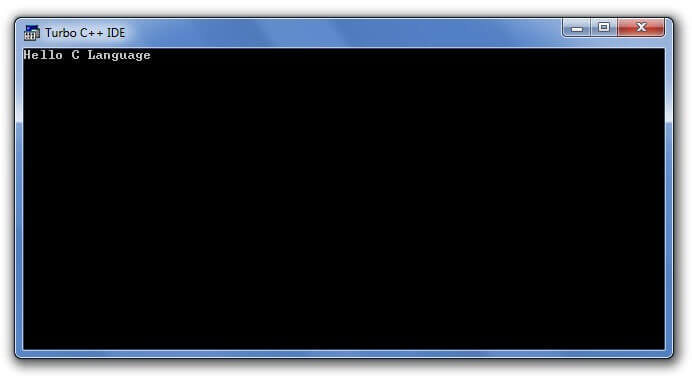
You will see the following output on the user screen.

c program output

You can view the user screen any time by pressing the alt+f5 keys.

Now press Esc to return to the turbo c++ console.

Setting Up C Environment

In this chapter, we are going to learn Environment Setup using IDE in C development environment using DevC++ tool in your machine and how to compile and execute a C program on your own. Below topics are covered on this page.

  1. What is C compiler?
  2. List of C/C++ compilers for Windows Operating System
  3. Steps to install DevC++ tool to compile and execute C programs
  4. List of C/C++ compilers for UNIX/LINUX Operating System

Note:

  • Nowadays, both C and C++ compilers are integrated together in same development environment.
  • For example, Turbo C++, Borland C++ and DevC++ provides Integrated Development Environment with compiler for both C and C++ programming language.
  • So, we can compile and execute both C and C++ programs in same Integrated Development Environment (IDE).

1. WHAT IS C COMPILER?

  • C Compiler is a program that converts human readable code into machine readable code. This process is called compilation.
  • Human readable code is a program that consists of letters, digits and special characters that we type in program window. Machine readable code is in 0’s & 1’s
  • For example, let’s assume that we type ” HELLO” in program window. We know that we have typed “HELLO” in program window.
  • But, processor knows only 01001000 for letter “H”, 01000101 for letter “E”, 01001100 for letter “L”, 01001100 for letter “L”, 01001111 for letter “O”
  • Because, all C programs are executed by processor which is available in CPU.
  • So, entire C source code should be converted into 0’s and 1’s as processor can understand only 0’s and 1’s.
  • So, compiler converts entire source code into 0’s and 1’s during compilation.
  • Output produced by compiler is in the form of 0’s and 1’s which is saved in .exe file. This file is called as executable or binary file.
  • This binary file is executed by processor as per logic written in source code and the output is displayed in output window.

2. LIST OF C/C++ COMPILERS FOR WINDOWS:

There are so many compilers available in the market for Windows operating system. We are listing some of them here for your reference.

1. AMPC
2. CCS C Compiler
3. ch
4. clang
5. Cygwin
6. Digital mars
7. GCC compiler
8. MikroC Compiler
9. Portable C Compiler, Power C, QuickC, Ritchie C Compiler, Small-C

3. STEPS TO INSTALL DEV C++:

Dev C++ is a free C & C++ IDE (Integrated Development Environment) for Windows and Linux.  It supports the compilation and execution of C & C++ languages. It is available with GCC compiler which is used to compile both C and C++ programs.

You can follow the below steps one by one to install Dev C++ in your local machine and you can start compiling and executing C programs.

1. Download Dev-C++ IDE from http://www.bloodshed.net/dev/devcpp.html

2. Click on source forge link under “Downloads -> Dev-C++ 5.0 beta 9.2 (4.9.9.2) (9.0 MB) with Mingw/GCC

3. Save the .exe file in your local machine.

4. Double click on the exe file.

5. Start the installation by clicking the Next button and I Agree on button.

6. Choose the destination folder as “C:\Dev-Cpp” (It is there by default) and click the “Install’ button and finally click the Finish button. You can modify this destination folder path if you want.

7. Once installation is completed, go to your desktop and right-click on My Computer -> properties -> advanced system settings -> advanced tab. Then, click on the “Environment Variables” button and then “New”. You will get a popup window as shown below.

Change the System variable as given below.

Variable name: PATH
Variable value: C:\Dev-Cpp\bin;

8. Once you are done with the above settings, then you can start Dev C++ by clicking start –> Dev C++ as shown below.

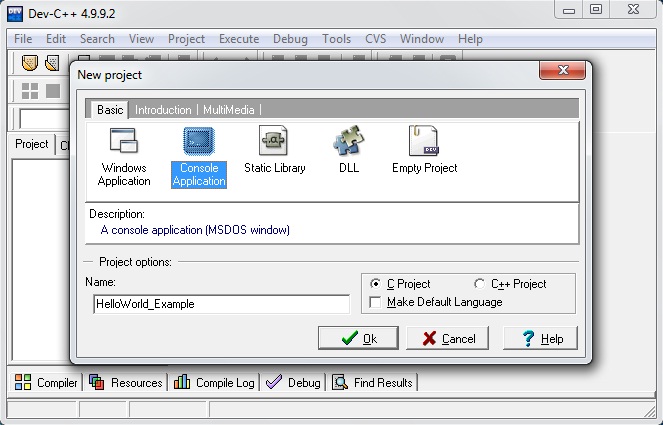
9.Open Dev C++ window and click on file -> new -> project. Then, select Console Application. Choose “C project” and “Make Default Language” check boxes.

10. Click on file -> new -> source file and type a sample program and save it as sample.c

11. Click on the “Compile & Run” button to compile and execute our program as shown below.

12. Output window will be opened as below when there is no compilation error. Use “Enter” button to come back to the program window.

4. LIST OF C/C++ COMPILERS FOR UNIX/LINUX OPERATING SYSTEM:

There are so many compilers available on the market for UNIX/LINUX operating system. We are listing some of them here for your reference.

1. AMPC
2. CCs C compiler
3. ch, clang
4. GCC C compiler
5. Interactive C compiler
6. Mikro C compiler
7. Portable C compiler
8. Small C and XL C Compilers etc.

The Structure of a C Program

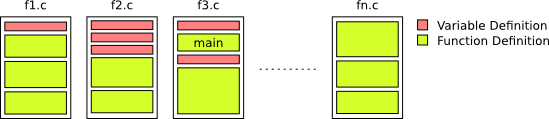
A C program is a set of functions, data type definitions, and variable declarations contained in a set of files. A C program always starts its execution by the function with the name main. Any function can invoke any other function and the variables declared outside the function are either global or local to the current file (if they are declared with the prefix). The following figure shows the structure of a C program contained in several files.

The C compiler is the program that translates a set of functions, definitions and declarations in multiple files into an executable file. The C compiler has a surprisingly simple behavior and performs much less work than expected when compared with others such as the Java compiler. To create an executable, the compiler processes the source files one by one independently. This means that the defined variables and functions are not remembered when processing another file. Furthermore, the compiler performs a single pass over the text, only those definitions up to the current compilation point are visible.

As a consequence of this behavior, a variable cannot be used unless it has been previously declared in the same file. Analogously, a function cannot be invoked unless its code has been previously included in the same file. To allow the division of code in multiple files the language allows the definition of “function prototypes” (the type of the result followed by the function name and the parameter types in parenthesis) without including the code, and also the definition of variables as “external”, that is, present in a different file. It follows an example of two files in which function fill_in and variable table are defined in one file but used inside in the main function.

File1.cFile2.c
1 2 3 4 5 6 7 8 9 10 11 12 13 14 #define SIZE 100 /* Array of 100 integers (Global)*/ int table[SIZE]; /* Fills an array with zeros */ void fill_in(int *t, int size) { int i; for (i = 0; i < size; i++) { t[i] = 0; } return; }1 2 3 4 5 6 7 8 9 10 11 12 #define SIZE 100 /* Global variable declared in other file */ extern int table[SIZE]; /* Function declared in other file */ void fill_in(int *, int); /* Program entry point */ int main(int argc, char *argv[]) { fill_in(table, SIZE); return 0; }

Line 3 in File2.c notifies the compiler that there exist an array of 100 integers with name table defined in another file. Line 6 is a function prototype. It contains the result type (void) followed by the function name (fill_in) and the type and name of the parameters in parenthesis (int *t, int size). This line informs the compiler that a function with this definition is in a different location in the program. Thanks to these definitions, Line 11 is correct. The function fill_in can be invoked, and the variable table is known.

Line 1 of both files (#define) corresponds to a preprocessor directive, which tells the preprocessor to replace every occurrence of a particular character string (in this case, SIZE) with a specified value (in this case, 100). The C preprocessor runs before the compiler and is in charge of these replacements. Use the #define directive when you have to define constants in your program, especially for size arrays. Write these constants in upper case always, in order to be easily readable.

The C Language and its Advantages

C, the oldest of the programming languages still in use today, is also one of the most powerful. C was originally designed as a system implementation language within Bell Labs and has since become one of the most popular programming languages in existence. It’s been used for developing operating systems, compilers, debuggers, and many other applications that involve low-level computer hardware interaction.

Here are 10 advantages to using C as your primary programming language,

Powerful and efficient language

C has been called a “portable assembler” and is used for low-level programming that can be compiled with different compilers. C’s efficiency makes it easy to write efficient code, which in turn improves runtime performance. Its versatility enables programmers to take advantage of many libraries like OpenCV (computer vision), SQLite (database management system), and GTK+ (windowing toolkit).

The fact that the language originated as an implementation language also gives these advantages: it was designed by experts who had experience writing programs on their own machines; because there are no pointers or other abstract concepts involved, you don’t have to worry about ever getting memory allocation wrong; and lastly, its simplicity leaves room for optimization opportunities.

Portable language

C is a portable language. It was designed to be compiled with different compilers and can run on most hardware platforms, which means you don’t have to know everything about the memory layout of your machine in order to write programs for it.

The C programming language also enables programmers to recompile their code without having any knowledge of assembly.

Built-in functions

C has many built-in functions that make it easier for programmers to write programs. Functions like scanf() and printf() can be called without declaring them first because they are automatically linked in by the compiler. A variety of libraries exist which provide an even greater selection of these types of function calls, enabling you to focus on your own.

Quality to extend itself

C is eminently extensible. The language has been extended by several different languages, including Java and Objective-C. It’s also possible to extend C in the same way with preprocessors like GCC or Clang which can generate code from a file that will take care of things for you automatically.

Open-source

The C programming language is open-source, which means that the code is publicly available and each programmer can modify it to suit their needs. This also enables programmers to create libraries for public use based on particular preferences or problems they want to be solved.

C’s simple design leaves room for optimization opportunities: every detail of structured programming language.

Structured programming language

C is a structured programming language, which means that it has an opening and closing brace for every block of code. The programmer can use the extra space provided by these braces to indent their code within each function, making everything easier to read.

Middle-level language

C is a middle-level programming language, which means it can be used for low- or high-level programming. It’s an excellent choice because of its efficiency and portability.

Implementation of algorithms and data structures

C is an excellent choice for implementing algorithms and data structures. Though it may seem like a low-level language, C has been used to create some of the most widely-used software in existence: operating systems, compilers, debuggers, etc.

Procedural programming language

C is a procedural programming language, which means that it provides instructions to the computer in order. It’s called “procedural” because of its use of procedures and functions for tasks like input/output. C also supports object-oriented programming through inheritance, polymorphism, and encapsulation; this enables programmers to create reusable code.

Dynamic memory allocation

C supports dynamic memory allocation, which means that a programmer can create and destroy sections of memory as needed. This is an essential aspect of modern programming languages because it’s impossible to know in advance how much space one will need.

Conclusion

The C programming language is a great option for anyone wanting to write their own programs. It’s not limited by the hardware or operating system it runs on, and the simplicity of its features leaves room for optimization opportunities and extensions.